|
|
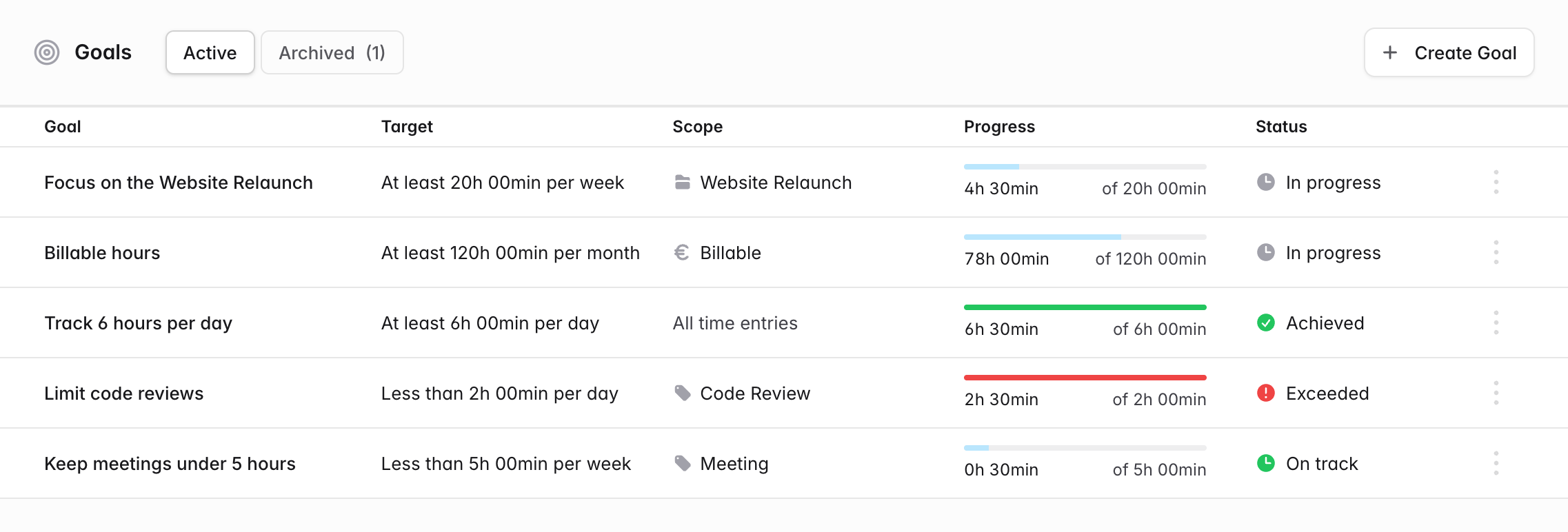
Goals are now live in solidtime! Set yourself time targets and track your progress right inside of solidtime.
For example:
Create a goal in secondsOpen Goals in the sidebar and click Create Goal. Give it a name, choose a target time and a period (day, week or month), and decide what kind of target it is: At least for things you want to do more of, like billable hours or focus time, or Less than for things you want to limit, like meetings. Count only the time that mattersEvery goal can be narrowed down with the same filters you know from reporting: projects, tasks, clients, tags, billable status and, with break tracking enabled, work time or breaks. See where you standThe Goals page shows the progress of every goal in the current period. Each goal gets a clear status: In progress or Achieved for targets you want to reach, On track or Exceeded for limits you want to stay under. Goals are personal: only you can see, edit or delete the goals you create. We plan to bring more features and improvements to Goals soon! To learn more, check out our Goals documentation or read the blog post. Try it out! |
|
Don't want to receive these e-mails? Unsubscribe View in browser |
 |